
How It Works?
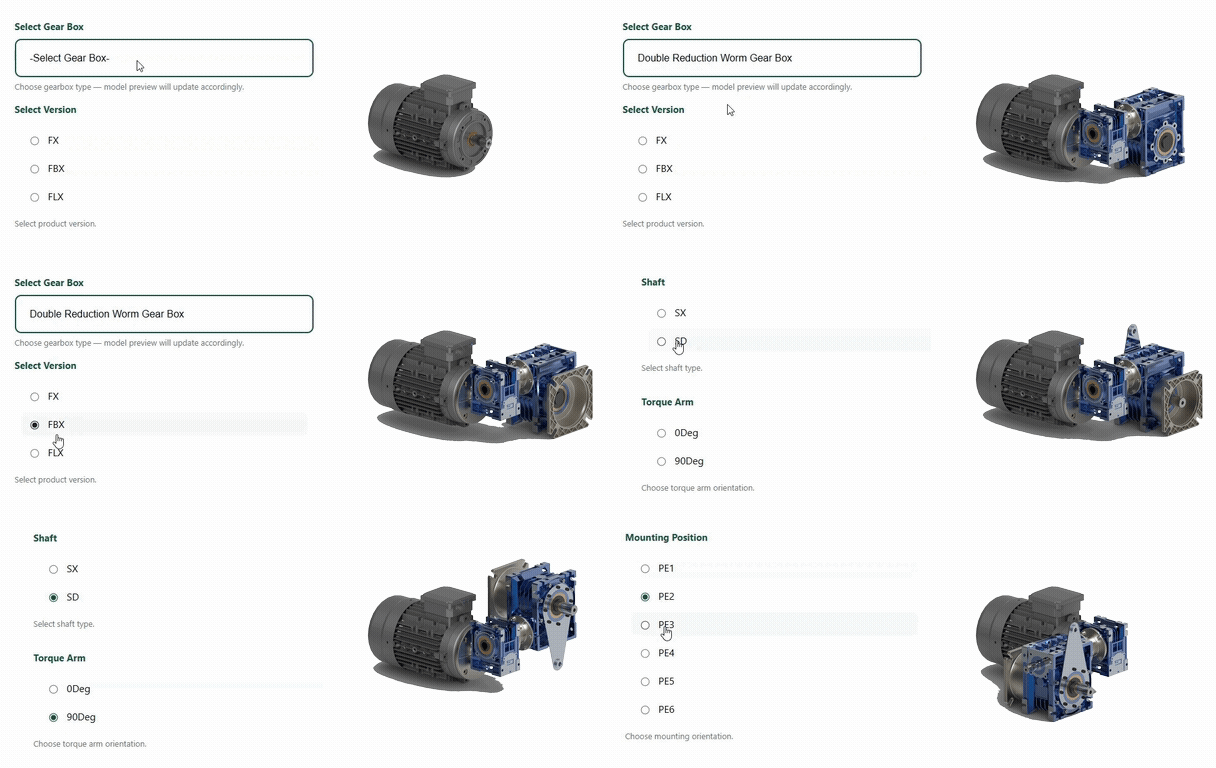
Your customers configure products online, and our system instantly generates accurate CAD models, drawings, and manufacturing data — all without engineering involvement. Here’s how the workflow works end-to-end:
1. Customer Selects Product & Options
Your website or portal displays a clean interface where users can:
➜ Choose product type,
➜ Select variants (Eg: gearbox model, frame size, material, etc.),
➜ Change dimensions, mounting style, orientation, and more.
2. Real-Time 3D Model Updates Instantly
As the user changes inputs, the 3D model updates in real-time:
➜ Real-time 3D updates,
➜ Rotatable, zoomable, interactive model,
➜ High-quality rendering.
3. Customer Downloads Files
Once the configuration is complete, the customer can:
Download CAD Models:
➜ Generate geometries programmatically using your parametric rules,
➜ Download CAD (Ex: STEP, IGES, PARASOLID, DXF etc.,),
Download 2D Drawings and Technical Docs:
➜ Fully dimensioned 2D drawings,
➜ Assembly drawings,
➜ Part lists,
➜ Bill of Materials (BOM),
➜ Specification sheets (PDF),
➜ Proposal Documents.
No engineer needs to manually draft anything.
5. Requests a Quote
The configurator also outputs:
➜ Send the configuration to sales,
➜ Request a quote instantly,
➜ Add to CPQ workflow (if integrated).
This drastically reduces the time from Inquiry → quotation → order.
6. Your Team Receives a Production-Ready Package
Sales or engineering receives an automatically generated data bundle:
➜ Configured CAD model,
➜ 2D drawings,
➜ BOM,
➜ Configuration parameters,
➜ Quote details,
➜ Order information (via CPQ/ERP).
It provides a single, trusted source of truth that keeps engineering, sales, and production fully aligned.
Give your customers the power to see
exactly what they are configuring, in real
time.
Seamless Integration with CPQ solutions
Connect our CAD engine to your existing tools — from part number generators and selection tools to full CPQ workflows. It plugs in cleanly and delivers instant 3D visualization, CAD files, and drawings
Embedded, Rule-Based UI
Don’t have a configurator yet? Use our intuitive, rule-driven interface to replicate your product selection logic and embed it directly into your website — so customers can configure complex products visually and easily.
With either option, you get the same result: a powerful, engineer-ready solution that brings CAD automation and interactive configuration into your digital experience
Level Up Your Product Selection and Sales Workflow
Reduce back-and-forth with customers and engineers
Eliminate manual CAD work for repetitive designs
Increase lead conversion with interactive buying experience
Provide a modern, self-service tool for your customers
Scale your sales process without scaling your engineering team
Ready to Get Started?
Want to see it in action? Let’s chat — we’d love to share examples of real client projects and integrations.
FAQs
1. Can it be embedded into our existing website?
Yes! The configurator can be embedded as an iframe, a widget, or integrated via API. It works seamlessly with most CMS platforms, eCommerce systems, and custom-built websites.
2. Can it integrate with our CPQ, ERP, or CRM system?
Absolutely. We offer flexible integration options with your existing tools — including CPQ workflows, part number builders, and ERP/CRM systems — using secure APIs and data mappings.
3. Do I need to provide CAD models?
Not necessarily. If you already have CAD models, we can work with them and convert them into configurable, parametric versions — which can help reduce implementation time & cost.
If you don’t have existing models, no problem — our team can create high-quality CAD models for your products quickly and accurately, based on your drawings, specs, or product data.
4. Is customer data and IP secure?
Yes. We use industry-standard encryption and access control, and your CAD files and configuration logic are protected by secure infrastructure.
5. How customizable is the interface?
The UI can be branded and styled to match your website, and the logic engine is fully configurable — from dropdowns and sliders to part logic, pricing tiers, and language settings.
6. How long does it take to launch?
Typical implementation takes 4–8 weeks depending on product complexity, number of configurations, and integration needs. Faster launches are possible for simpler setups or standard product lines
7. Can users submit RFQs or orders directly from the configurator?
Yes. The configurator can include a quote request form, pricing calculator, or direct integration with your eCommerce checkout or sales team inbox.